Integrations
Employees act through your real business tools — email, CRM, accounting, shops, social. An owner connects a tool once; you decide which employees may use it.
Connect a tool
Connect from the Integrations page — usually a sign-in or a pasted API key. Search by name, or narrow by Category (Email & Calendar, Files & Docs, Documents & Signing, CRM & Sales, Support & Helpdesk, Team comms, Project & Dev, Finance & Payments, Online shop, Marketing, Analytics, HR & Time, Automation) and Show (available, connected, on the roadmap). Connecting and disconnecting are owner-only.
Credentials are stored encrypted and never shown back in full. The tools you named at signup appear as favourites. If a connection stops working, a banner says so and Reconnect fixes it.
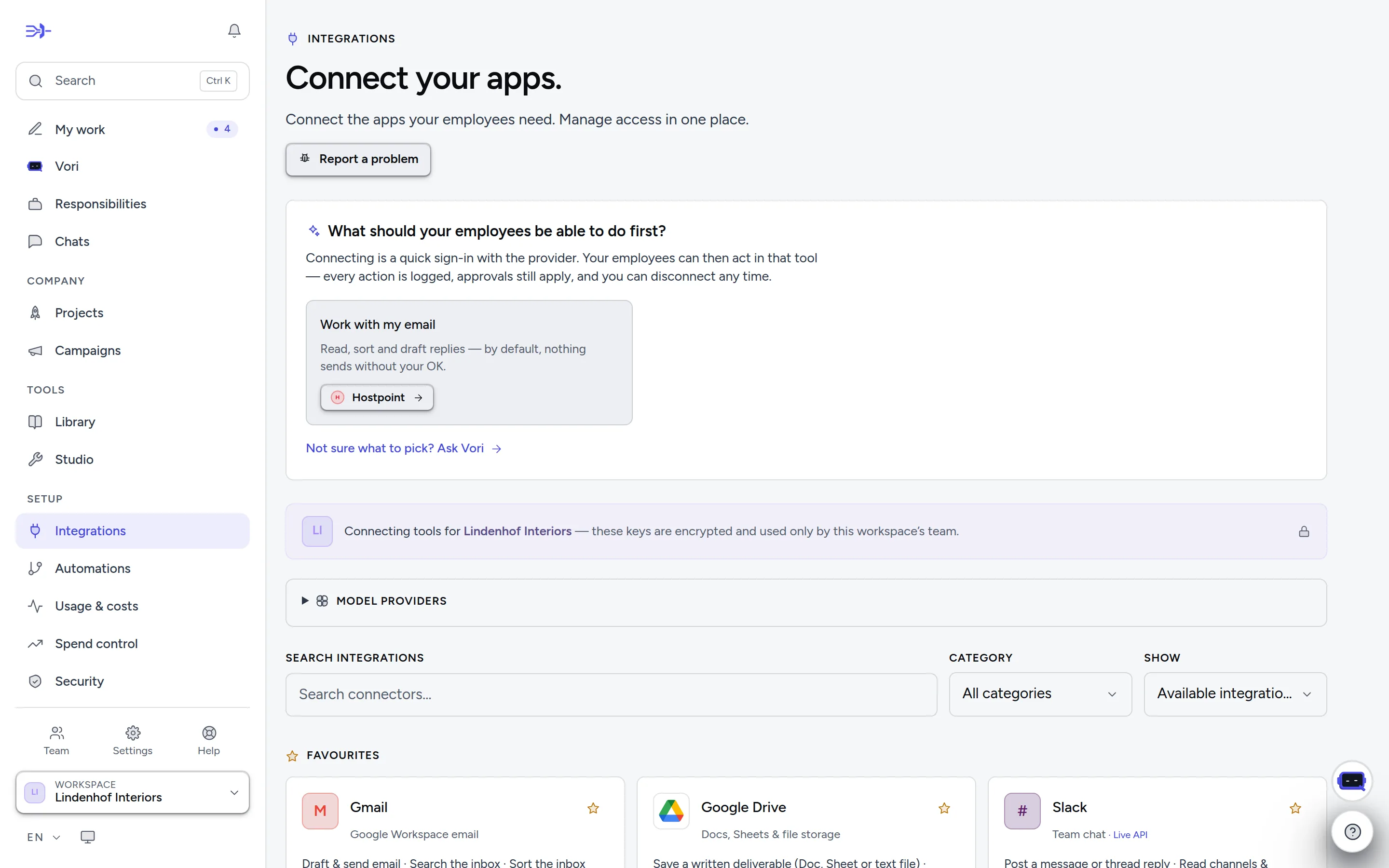
- 1Find a tool by name…
- 2…or narrow the catalog by category, and show what's available, connected or on the roadmap.
- 3Model providers power the thinking itself; open the list to see which are active.
- 4Something wrong with a tool? “Report a problem” reaches support with a reference number.
Who gets access
Employees use the connectors you gave them — set per employee in its editor, or let Enti grant access on your go-ahead. One exception: when Outlook, Gmail, a Hostpoint or an Infomaniak mailbox is connected, every employee can read the company inbox unless you exclude it (Company inbox in its editor); sending still needs the connector. Marketing employees also see ads performance once an ads platform is connected.
Custom connectors — a webhook or a REST API, optionally imported from an OpenAPI file — let you wire in any tool with an HTTP API.
Reading vs. writing
On each connected card, an owner sets What employees may do: Read only (look things up; nothing is created, changed, sent or deleted), Read & write (everything except deleting or removing) or Full (incl. deleting), where a delete still waits for your approval. A connection starts at Full. Lowering the level applies at once; raising it asks for your password again.
On the Security page, under per-connector permissions, you decide per tool — separately for reading and writing — Default, Allow, Ask first or Block. «Read Gmail but never send» is one setting. On a connected card, Approvals for writes offers the quick version: standard, ask first, block writes. Anything you leave alone keeps the default: reads run, writes follow the approval rules.
Swiss specifics
Swiss needs are first-class:
- Swiss QR-bills are read deterministically (checksum-verified), not guessed at by a model.
- Zefix looks up the commercial register — company, UID, legal seat — instead of guessing (it needs a free Zefix webservice login).
- Federal sources, no account needed: the ESTV exchange rates for VAT, the UID register (is this VAT number live, is this company still active) and the SHAB gazette.
- Dunning under Swiss law: the bexio reminder run works out default interest, limitation and debt-collection holidays and prepares the Betreibungsbegehren data sheet — prepared, never filed.
- Payroll: employees compute a Lohnlauf from the statute for the years it is encoded; your insurer and fund rates are yours to give — a missing one stays open, never guessed. bexio Lohn and KLARA Lohn connect to the payroll you already run.
- Pingen turns a PDF into real postal mail, always drafted first; by default, dispatch needs your approval.
Accounting and ERP
Employees read your books where they already are and prepare entries for you to release. They do not post or send on their own.
- bexio: Sign in with bexio on its card. Invoices, bills, payments, contacts, dunning, the MWST worksheet, payment files and bexio Lohn.
- Abacus: your Abacus server address, the mandant number, and the client ID and secret of an API service user created in Abacus program Q910 (your Abacus partner can switch on the API licence). Employees read accounts, balances, VAT codes, open customer and supplier invoices and the journal. A booking goes only into a batch (Stapel) that you release in Abacus.
- AbaNinja: an API token from Settings → Automation → API Tokens (paid AbaNinja plans) with the scopes customers, suppliers, finances and profile. Employees see open and overdue invoices, bills still to pay and payments, and can draft an invoice that is never sent.
- weclapp: the tenant (the name before .weclapp.com) and an API token from My settings → API. Employees see open and overdue invoices and supplier bills with weclapp's own open amounts, find customers, read sales orders and the stock per warehouse. Read-only.
- KLARA, CashCtrl, Banana, Run my Accounts and Smallinvoice connect with the key their card asks for.
- Microsoft Dynamics 365 Business Central connects with a Microsoft sign-in. Its card shows on the roadmap until that sign-in is set up for Entumo, and offers Sign in with Microsoft once it is. It reads open sales and purchase invoices, aged receivables and payables, the trial balance and G/L entries, and drafts sales invoices that are never posted.
- Not connectable yet: Winbiz, Crésus, Sage, Xero and QuickBooks. Their partner access or sign-in is still missing.
Bank and payments
- Your house bank (UBS, PostFinance, ZKB, Raiffeisen, cantonal banks): there is no direct bank feed yet. Upload the camt statement file, or let employees read it from a connected mailbox.
- Revolut Business is a read-only bank feed (Revolut's Business API needs the Grow plan or higher). Its dialog walks you through three steps: create the certificate, add it with the redirect address shown in Revolut Business → Settings → APIs → Business API, then paste the client ID and authorise read-only access. Revolut asks for the consent again every 90 days; Authorise again renews it without pasting anything. Nothing in Entumo can move money on Revolut. On Receipts, Or read it straight from Revolut Business checks a month of card spend for missing receipts without exporting a file.
- Stripe: a restricted API key (Stripe → Developers → API keys). Besides payment links, invoices and refunds (after approval), an employee can split a payout into sales, refunds and fees and check that it matches the amount on your bank statement.
- Payrexx, Datatrans, Wallee, PostFinance Checkout, Saferpay, SumUp and PayPal connect with their keys; TWINT payments arrive through them.
- Not connectable yet: Wise (its personal tokens cannot read statements of Swiss accounts) and Mollie.
Files, signing and post
- Infomaniak kDrive (files stored in Switzerland): an API token from manager.infomaniak.com → Account → API tokens with the scope drive, and the kDrive ID (the number after /drive/ in the kDrive address). Employees list, search and read files (kDrive converts PDF, Word and Excel to text), create folders and save their work there. An upload never overwrites: a name that is taken gets a renamed copy. A public share link waits for your approval. Moving, renaming and deleting are not possible.
- Skribble: the API username and key from Skribble → Settings → Business API. Employees ask for signatures on a PDF from one or several signers, in order if needed, at SES, AES or QES (ZertES or eIDAS). They see who has signed, remind open signers or withdraw a request, and file the signed PDF into the task. Sending a request waits for your approval.
- Swiss Post: your own business-customer access. At developer.apis.post.ch create an application, subscribe it to Barcode and/or Track consignments, and paste its client ID and secret. Tracking needs nothing more. Domestic parcel labels also need your franking licence and the sender address, and each label waits for your approval because it is charged to your licence.
- DocuWare: your DocuWare address (the name before .docuware.cloud), a DocuWare user and its password. Best give Entumo its own user with rights only to the cabinets it should use. Employees list cabinets and document trays, search documents by their index fields, and file a receipt or contract from a task into a tray (where you index and store it) or into a cabinet with the index values you gave. Every filing waits for your approval; nothing is deleted or moved. DocuWare stays your archive for the 10 years.
- Pingen sends a PDF as a real letter (see above).
- Not connectable yet: PEAX, Dropbox and Box.
Shop, newsletter and customer messages
- Lightspeed Retail (X-Series till): your store address (the name before .retail.lightspeed.app) and a personal token from Lightspeed → Setup → Personal tokens (admin users on the Plus plan). Employees add up the till's completed sales per shop for a period, with VAT, and read products and stock per shop. These are till takings, not booked revenue. Read-only; Lightspeed Restaurant is open to Lightspeed partners only.
- Shopware 6: your shop address and an integration from the Shopware Administration → Settings → System → Integrations (access key ID and secret access key). Employees read orders with payment and delivery state, customers and products with stock; they can set a product's stock and mark an order shipped with its tracking number.
- CleverReach: create an OAuth app under My account → Extras → REST API and paste its client ID and secret. Employees read lists, recipients and mailing reports, add a recipient with double opt-in and deactivate one. A newsletter is created as a draft: you send it in CleverReach.
- Superchat: the API key from Superchat → Settings → Integrations → API (only a Superchat admin sees it). Employees read WhatsApp, Instagram, Messenger, e-mail and SMS conversations, find and create contacts, and add notes and labels. An answer or a WhatsApp template waits for your approval. While Entumo's own WhatsApp card is not connectable yet, Superchat is the way to WhatsApp.
- ASPSMS (Swiss SMS gateway, prepaid credits): the UserKey and API password from aspsms.com → Login → API Credentials, and optionally a default sender. An SMS goes to at most 10 numbers. The approval shows the exact text and how many SMS parts it uses, and employees can check delivery and the credit balance.
Time tracking
Connect MOCO, Clockify, Toggl Track or Clockodo (or use bexio's time tracking), and Job reports shows Hours from your time tracker to owners and the finance team. It lists billable hours not yet billed per customer and project, never per person, for last month, this month or the last three months. Make job report turns a row into a draft you invoice through bexio as usual. A row that is already in a report is marked, so the hours are not billed twice. Toggl Track and bexio have no "billed" mark, and the card says so.
- MOCO: the account name (the part before .mocoapp.com) and an API key.
- Clockify: an API key from Profile settings → API; the data-region host only if you are not on the standard cloud.
- Toggl Track: the API token from Profile settings; the workspace ID only if it is not your default one.
- Clockodo: your login e-mail and the API key from My area → Personal data. An administrator's key sees the whole team's hours.
- Harvest connects with a sign-in and shows on the roadmap until that sign-in is set up for Entumo.
Report a problem
Something wrong with a connector? Report a problem on its card (even an unavailable one), in its connection dialog or at the top of the page. The report names the connector, reaches support with a reference number, and keeps your text if sending fails.
Tools on the roadmap
Some tools are in the catalog but can't be connected yet — the provider needs partner onboarding, has no public API, or requires its own sign-in integration. They are hidden unless you choose Show → On the roadmap. A tool that connects by sign-in becomes connectable as soon as that sign-in is set up — its card then offers Sign in with….